The key to formatting papers (like the key to citation) is understanding categories. Once you know the constituent parts, you can reference any style manual to find the particulars required by your designated style.
This page shows you how to format an essay in MLA, the bibliographic standard for Literature and Language Studies. The Sciences, Social Sciences, and Education rely on APA. (Academic History, Humanities, and Fine Arts papers often use the third most common bibliographic style, Chicago.)

The Heading
Headings often refer to titles.
APA uses headings to denote titles, and the style differentiates titles based on levels.
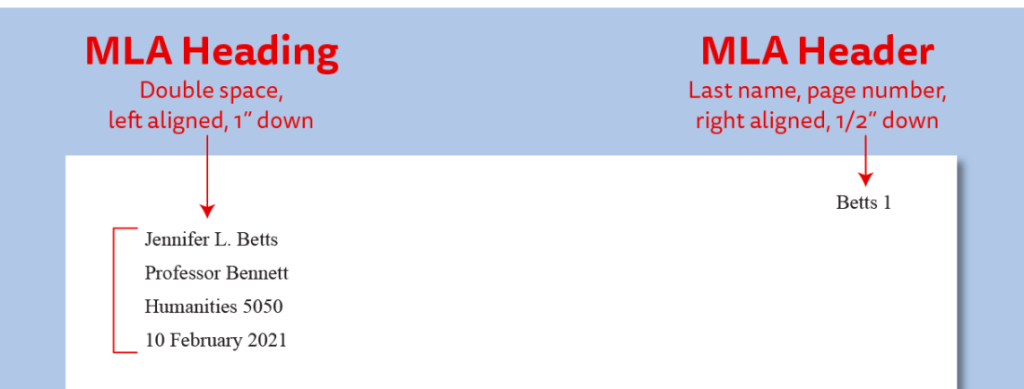
MLA style acknowledges headings within a paper, but it uses the term “heading” primarily to refer to the ‘author, instructor, and course info’ on the first page of a paper. The author’s lat name and page number (which should be visible on every page) is the MLA “header.”
Elements of the MLA heading, in proper order:
- the author’s full name
- the name of the instructor who assigned the writing project
- the course name
- the date
Because we are using MLA style, we will be including names and dates in a header on the first page of the paper. Were we using APA, this information would be on a separate title page.
(Special note: MLA does allow for a separate title page, which it refers to as a cover page. It is just not the norm of the style.)
The Title
In MLA style, essay titles come after the heading. Essay titles should
- designate the essay’s subject
- be capitalized
- be centered on the page
Essay titles should not
- merely repeat the general category of assignment
- be italicized, bolded, underlined, or in quotation marks
- be justified to a margin
Do not label any of your papers “TCritique,” “The Response Paper,” or “The Simple Synthesis.” Give your essays specific titles that speak to your particular topics, and put this capitalized title (which should not be italicized, bolded, underlined, or in quotation marks) in the center of the page.
Margins, Font, and Spacing
MLA and APA are in agreement on margins, font, and spacing. Both styles recommend 1″ margins, a readable 11 or 12-point font (e.g. 11-point Calibri or Arial or 12-point Times New Roman), and double spacing.
In other words, both require uniform textual elements for legibility.
The recommended margins and font size delimit the words on the page, keeping students from either wasting space or filling it too completely. The double spacing allows for ease of reading.
Upshot: you will want to get in the habit of double spacing and setting appropriate margins.
The brief video below shows you how to
- center your title
- double space your paragraphs
- properly indent your paragraphs and
- add a page number
in Word online. (Important points: this video does not explicitly double space the heading or include a last name by the page number. It does, though, show you where the tools are to make these changes. If you need help setting margins–which are under “Layout”–contact me. Just know that 1″ margins are the “Normal” layout that is the default of Word!).
And what of those who compose in a word processing program other than Word? I have three possible solutions for you–pick one:
- learn the formatting tricks of your chosen program (Google and YouTube are your friends here!)
- cut and paste your finished essay into Word online when you are ready to submit, and follow the guidance above or
- start composing in Word (you do pay for this program as part of your tuition–use it!)
Don’t Forget the Word Count
Our class will add one feature that is not a standard part of paper formatting: word count. This number should include the title of the essay as well as the body of the paper. It should not include any bibliography (which, in our case is Works Cited) information.
See the videos below for “how to”s.
Word counts should be included at the end of the end of the essay, before any list of works that are cited.
To include this, just type “Word count,” include a colon, and list the number. It should look like this:
Word count: 1127

